[oracle@oel7 ~]$ oerr ORA 28040 28040, 0000, "No matching authentication protocol" // *Cause: There was no acceptable authentication protocol for // either client or server. // *Action: The administrator should set the values of the // SQLNET.ALLOWED_LOGON_VERSION_SERVER and // SQLNET.ALLOWED_LOGON_VERSION_CLIENT parameters, on both the // client and on the server, to values that match the minimum // version software supported in the system. // This error is also raised when the client is authenticating to // a user account which was created without a verifier suitable for // the client software version. In this situation, that account's // password must be reset, in order for the required verifier to // be generated and allow authentication to proceed successfully.
使用 TNS 方式连接,需要使用 netmgr 配置网络服务名
1
[oracle@oel7 ~]$ sqlplus sys/oracle@orcl as sysdba
[oracle@oel7 ~]$ . oraenv ORACLE_SID = [orcl] ? mydb The Oracle base remains unchanged with value /u01/app/oracle [oracle@oel7 ~]$ sqlplus / as sysdba
SQL*Plus: Release 19.0.0.0.0 - Production on Sun Jan 514:18:282025 Version 19.3.0.0.0
Copyright (c) 1982, 2019, Oracle. All rights reserved.
Connected to an idle instance.
SYS@mydb()> startup restrict force mount; ORACLE instance started.
Total System Global Area 1241510120bytes Fixed Size 9134312bytes Variable Size 754974720bytes Database Buffers 469762048bytes Redo Buffers 7639040bytes Database mounted.
SYS@mydb(CDB$ROOT)> select status from v$instance;
STATUS ------------ MOUNTED
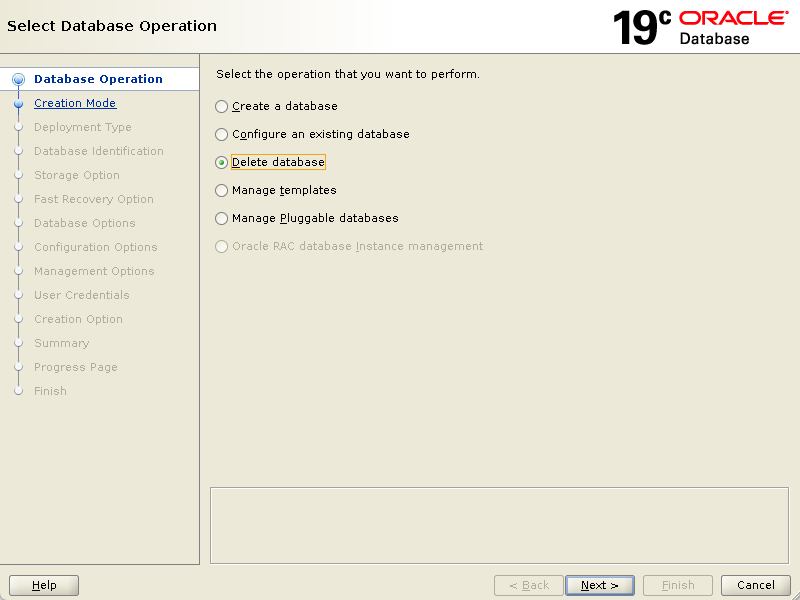
SYS@mydb(CDB$ROOT)> drop database;
Database dropped.
Disconnected from Oracle Database 19c Enterprise Edition Release 19.0.0.0.0 - Production Version 19.3.0.0.0
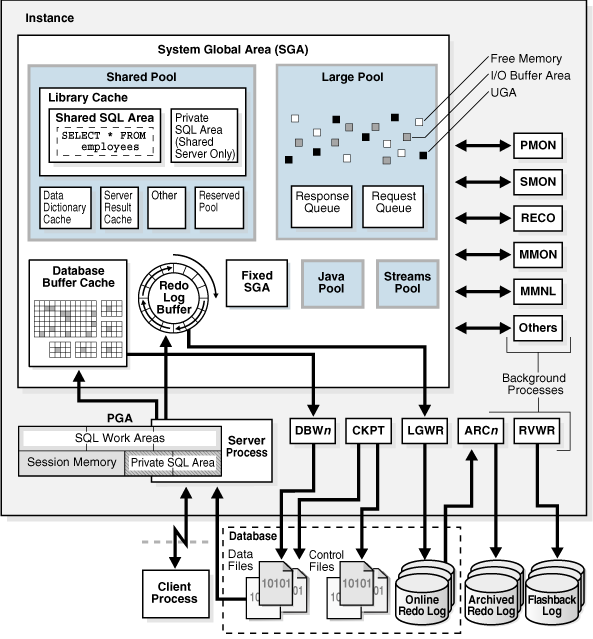
启动实例,分配 SGA(System Global Area),启动一个或多个后台进程。 SGA 具有多种用途,例如:
维护许多进程和线程同时访问的内部数据结构
缓存从磁盘读取的数据块
在将重做数据写入联机重做日志文件之前对其进行缓冲
存储 SQL 执行计划
查看 SGA 信息:
1 2 3 4 5 6 7 8 9 10 11
SYS@orcl(CDB$ROOT)> show parameters sga
NAME TYPE VALUE ------------------------------------ ----------- ------------------------------ allow_group_access_to_sga boolean FALSE lock_sga boolean FALSE pre_page_sga boolean TRUE sga_max_size big integer 1184M sga_min_size big integer 0 sga_target big integer 1184M unified_audit_sga_queue_size integer 1048576
Total System Global Area 1241510120bytes Fixed Size 9134312bytes Variable Size 318767104bytes Database Buffers 905969664bytes Redo Buffers 7639040bytes SYS@orcl(CDB$ROOT)> alter database mount;
Database altered.
SYS@orcl(CDB$ROOT)> alter database open;
Database altered.
SYS@orcl(CDB$ROOT)> select status from v$instance;
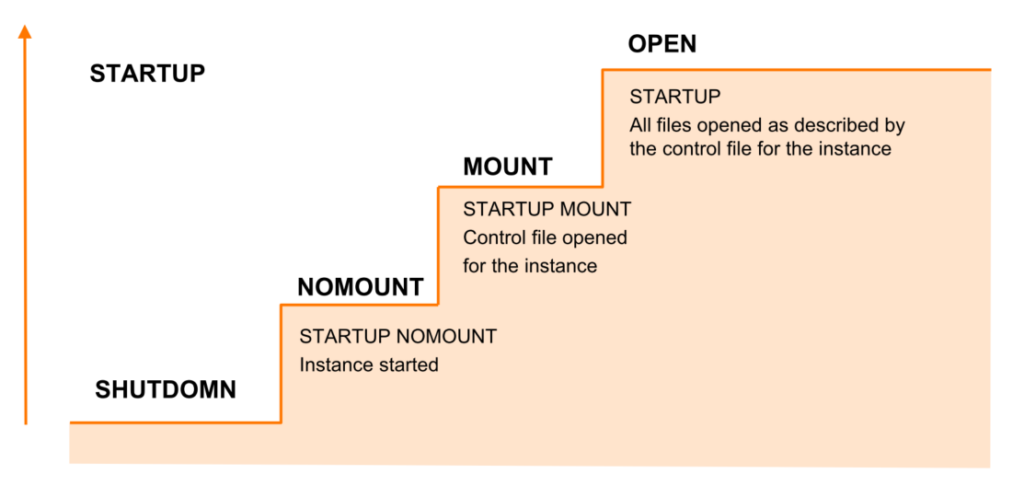
对于 CDB,启动和关闭与之前传统数据库的方式一样: 启动:startup [nomount | mount | restrict | force | read only] 其它命令:
1 2 3 4 5 6
startup open read only --select open_mode from v$database; startup restrict ALTER SYSTEM ENABLE RESTRICTED SESSION; ALTER SYSTEM DISABLE RESTRICTED SESSION; create user c##123 identified by 123; grant create session to c##123;
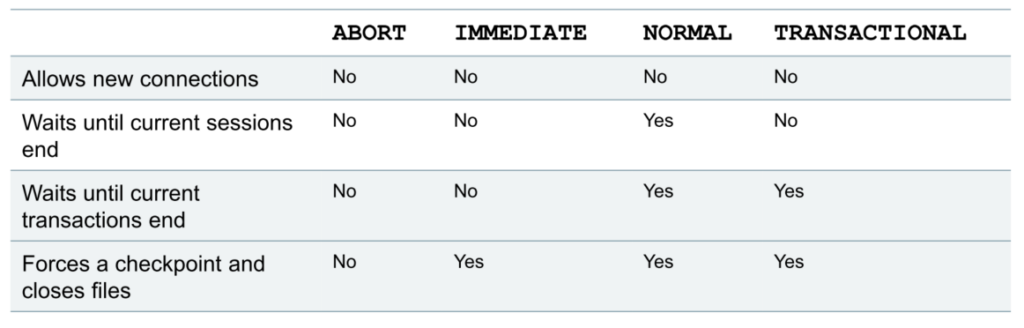
关闭:shutdown [immediate | abort]
默认情况下使用 sqlplus / as sysdba 登录连接的是 CDB。 在 CDB 启动之后,PDB 是自动启动到 mount 状态,而不是 OPEN 状态。
分步骤关闭 CDB:
1 2 3 4 5 6 7 8 9 10 11
SYS@orcl(CDB$ROOT)> alter database close;
Database altered.
SYS@orcl(CDB$ROOT)> alter database dismount;
Database altered.
SYS@orcl(CDB$ROOT)> shutdown ORA-01507: database not mounted ORACLE instance shut down.
也可以直接关闭:
1
shutdown immediate
启动和关闭 PDB: 启动或关闭一个或多个 PDB,指定的名称为一个以逗号分隔的列表:
1 2 3 4 5 6 7 8 9 10 11 12 13 14 15 16 17 18
SYS@orcl(CDB$ROOT)> show pdbs;
CON_ID CON_NAME OPEN MODE RESTRICTED ---------- ------------------------------ ---------- ---------- 2 PDB$SEED READ ONLY NO 3 PDB1 MOUNTED 4 PDB2 MOUNTED SYS@orcl(CDB$ROOT)> alter pluggable database PDB1 open;
Pluggable database altered.
SYS@orcl(CDB$ROOT)> show pdbs;
CON_ID CON_NAME OPEN MODE RESTRICTED ---------- ------------------------------ ---------- ---------- 2 PDB$SEED READ ONLY NO 3 PDB1 READ WRITE NO 4 PDB2 MOUNTED
关闭 PDB:
1 2 3 4 5 6 7 8 9 10 11
SYS@orcl(CDB$ROOT)> alter pluggable database PDB1 close;
Pluggable database altered.
SYS@orcl(CDB$ROOT)> show pdbs;
CON_ID CON_NAME OPEN MODE RESTRICTED ---------- ------------------------------ ---------- ---------- 2 PDB$SEED READ ONLY NO 3 PDB1 MOUNTED 4 PDB2 MOUNTED
其它的一些启动和关闭操作:
1 2 3 4 5
alter pluggable database prod1 close; alter pluggable database pdb1,pdb2 open read only; alter pluggable database pdb3 open RESTRICTED; alter pluggable database pdb1,pdb2 close immediate; select name,open_mode from v$pdbs;
启动或关闭所有 PDB:
1 2
alter pluggable database allopen; alter pluggable database all close immediate;
排除某些 PDB 不启动:
1 2
alter pluggable database allexcept pdb1 open; alter pluggable database allexcept pdb1 close immediate;
从根容器切换到 PDB:
1 2 3 4 5 6 7 8 9
SYS@orcl(CDB$ROOT)> alter session set container=PDB1;
Session altered.
SYS@orcl(CDB$ROOT)> show con_name;
CON_NAME ------------------------------ PDB1
从 PDB 切换到根容器:
1
2
3
4
5
6
7
SYS@orcl(CDB$ROOT)> conn / as sysdba Connected. SYS@orcl(CDB$ROOT)> show con_name
Total System Global Area 1241510120bytes Fixed Size 9134312bytes Variable Size 335544320bytes Database Buffers 889192448bytes Redo Buffers 7639040bytes Database mounted. Database opened. SYS@orcl(CDB$ROOT)> show pdbs;
CON_ID CON_NAME OPEN MODE RESTRICTED ---------- ------------------------------ ---------- ---------- 2 PDB$SEED READ ONLY NO 3 PDB1 READ WRITE NO 4 PDB2 READ WRITE NO
取消自动启动 PDB:
1
SYS@orcl(CDB$ROOT)> alter pluggable database all discard state;

评论· · · · · ·